There are a lot of good reasons to require a customer account on checkout:
- It’s easier for customers to manage their orders and get support.
- It’s for customer to purchase again (all their details are saved).
- It’s easier for store manager to track life time value of customers.
However, the checkout process for first time customers should still be as seamless as possible. This is why I like to create accounts automatically if the email hasn’t been used before. WooCommerce has this functionality built-in.
How to Set Up Automatic Accounts
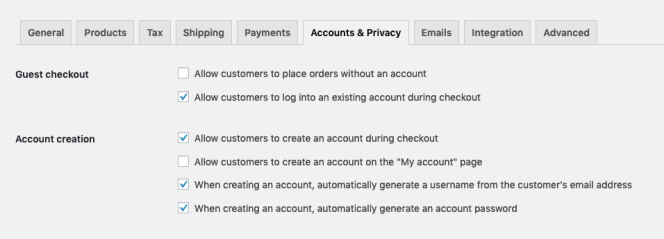
Go to your WooCommerce “Accounts & Privacy” Settings and check the following:
- Allow customers to create an account during checkout.
- When creating an account, automatically generate a username from the customer’s email address.
- When creating an account, automatically generate an account password.
Now when a new customer checks out from your site, they will be sent a welcome email with their new account log in information.
Tweaking the Email
The new account email text is generated by this template. By default the email sends new customers a generated username to log into their account. However, users have been able to log in with their email address since WordPress 4.5, so it seems weird to make them remember an arbitrary username we’ve created.
Instead, I send an email that let’s the customer know they can log in with their email using this code snippet.
If you’re not interested in editing code on your site, you could also use a plugin like Email Customizer for WooCommerce to make the modifications.
P.S. If you use coupons on your WooCommerce site, check out my Coupon Restrictions extension.


